Mostrando entradas con la etiqueta speedtest. Mostrar todas las entradas

jueves, 22 de octubre de 2020

Test de velocidad para mikrotik


Para acceder a la herramienta de prueba de ancho de banda desde Webmin o Winbox hay que dirigirse a System > Bandwidth Test. Su uso es bastante simple: se ingresa la IP (v4 o V6), si descarga, envía o ambos (dirección de datos) y las credenciales (usuario y contraseña) correspondientes al servidor.
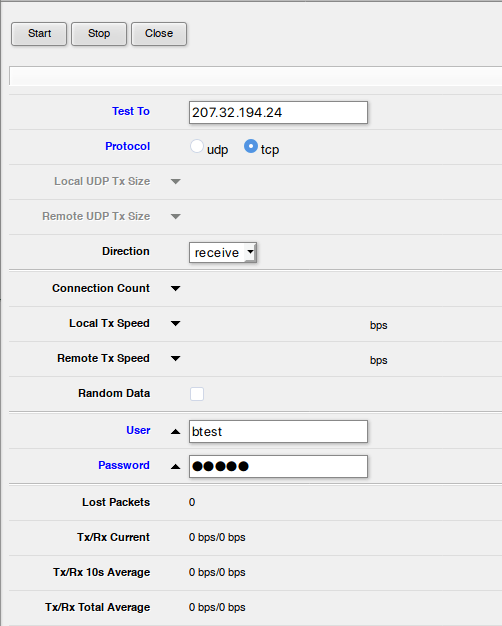
Prueba de ancho de banda mikrotik

Para utilizar esta herramienta desde la terminal utilizamos el comando bandwidth-test. En el siguiente comando vamos a hacer una prueba por 15 segundos en ambas direcciones.

/tool bandwidth-test address=207.32.194.24 direction=both duration=15s user="btest" password="btest"

Servidores públicos Mikrotik.

Si sólo se cuenta con un router Mikrotik, existen un par de servidores públicos para hacer las pruebas correspondientes. ⚠️ NO ABUSAR

IPv4: 207.32.194.24
IPv6: 2605:4e40:0:1fe::
Usuario: btest
Contraseña: btest

IPv4: 87.121.0.45
Usuario: neterra
Contraseña: neterra


Fuente:

https://logico.ar/blog/2019/09/9/probar-la-velocidad-de-internet-desde-un-router-mikrotik

jueves, 16 de abril de 2015

Speedtest linux centos

Speedtest-cli is a small command line application meant for testingyour internet speeds via Terminal in various Linux distributions including CentOS, Fedora, Ubuntu and Mint. Speedtest-cli uses thespeedtest.net website for testing your internet bandwidth. Installation is rather simple. Launch Terminal in your linux distribution and copy paste the following commands
# wget https://raw.github.com/sivel/speedtest-cli/master/speedtest_cli.py
# chmod +x speedtest_cli.py
Run an internet speed test with the following command:
# ./speedtest_cli.py
speedtest-cli If you want to share the speed test result, you can use “–share” option, which will allow you to share speed test result with others in an image format via Speedtest.net.
# ./speedtest_cli.py --share
speedtest-cli-shareThe following is a sample image automatically generated and uploaded to Speedtest.net by speedtest-cli.
3225139972
The utility supports a few other parameters, and you can view them by running the speedtest-cli.py –help command.
# ./speedtest_cli.py --help
./speedtest_cli.py --help
Usage: speedtest_cli.py [options]

Command line interface for testing internet bandwidth using speedtest.net.
--------------------------------------------------------------------------

https://github.com/sivel/speedtest-cli

Options:
  -h, --help       show this help message and exit
  --share          Generate and provide a URL to the speedtest.net share
                   results image
  --simple         Suppress verbose output, only show basic information
  --list           Display a list of speedtest.net servers sorted by distance
  --server=SERVER  Specify a server ID to test against
  --mini=MINI      URL of the Speedtest Mini server
  --source=SOURCE  Source IP address to bind to
  --version        Show the version number and exit


Fuente: http://lintut.com/test-internet-speed-from-linux-command-line/